
A brief fails in a specific way: it is one sentence and a hope. The reference pulls toward one structure, the style note pulls toward another, and the words in between belong to neither. Every later decision inherits that disagreement, which is why a weak brief is rarely rescued by a good edit.
The fix is a page, not a paragraph.
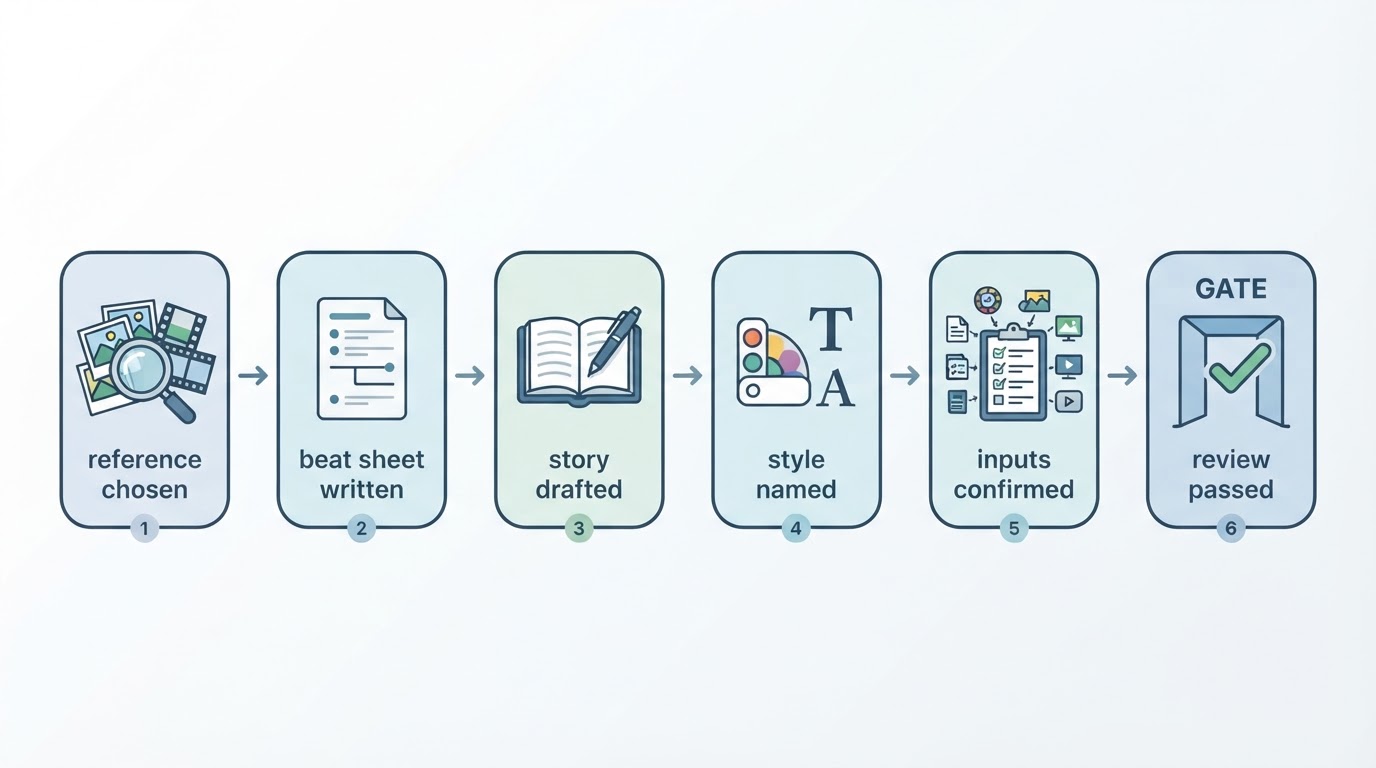
The video brief template on this site is six fields, filled in order, each one a sentence or two. This article walks through how to fill each field so the finished brief survives contact with generation: the template gives you the boxes, this is what goes inside them.
Ten minutes is the right budget. Longer than that and you are usually writing two videos into one brief, which is a problem for Field 1, not for the clock.
Field 1: Audience and one question
Name who is watching, then write the one question this video answers for them. Not a persona with an age bracket and a job title. A person you could say out loud: a café owner who posts twice a week and cannot tell why nothing gets watched.
Then the question: “why does my latte art video stop at second three?” or “is this course worth a Saturday?” One question per video. A short film that answers two questions answers neither, and the edit will show it: two endings, or an ending that serves the first question and forgets the second.
The test: if you cannot write the question in one line, the video does not have a job yet. Park the brief and pick the question first.
Field 2: Reference video
Link one short video whose opening, beats and ending you can describe without rewatching it. Note what you are taking from it, the structure, the pacing, or a single transition, and stop there. You are borrowing a shape, not footage.
The test for a usable reference: write its beat order from memory in three lines. If you need the video open in another tab to describe it, you are not ready to brief against it. Rewatch it until the order is yours, or pick a reference you already know that well.
Field 3: Original story
This is the field people skip, and the skip is expensive. Write your own scene, subject and lines: your counter, your product, your customer's hands, your words. When a shot only works because it came from the reference, the fix is rebuilding it with material you have the right to use, and the brief is where you make that substitution visible.
A workable pattern is same shape, new substance. Keep the reference's opening-beats-close rhythm; make every shot show something that belongs to you. Whoever reads the brief should be able to point at any line and tell which part is borrowed structure and which part is yours.
Field 4: Look and style
Choose a saved style and add one sentence on colour, pace and tone. The style carries the look; the brief carries the message. “Warm morning light, handheld, calm tone” is a sentence. “Make it cinematic” is not: cinematic is a mood, not a setting, and two people will read it two ways.
If your account has saved styles, name the one this video uses so the choice is recorded. If the look is new, describe the three attributes that matter: light, pace, tone. Resist the fourth adjective; it is where style notes start arguing with themselves.
Field 5: Shot order and length
List the opening, two or three beats, and the close, with a rough duration for each. Fifteen to thirty seconds is enough for one idea, and the duration is where an over-stuffed brief confesses itself: if the beat list cannot fit in twenty-five seconds, the video has two ideas in it, and this field should say which one goes first.
Example order for a café video:
- 0:00–0:03 — close on the pour, steam catching the light. Hook: a claim about the morning rush.
- 0:03–0:12 — three beats: order at the counter, the cup handed over, the first sip by the window.
- 0:12–0:18 — close on the menu board with one line of text: “open at 7”.
Six seconds per beat is a rhythm you can actually shoot. If the brief includes voiceover,
word count and seconds are the same budget, so time the lines before committing them to the page.
Field 6: Pre-publish checks
Note the facts to verify before publishing: names, prices and offer wording, plus the channel you will publish from and who confirms the upload. Two minutes here replaces a re-upload later. “Price is $4.50, verify against the menu PDF” is a check. “Get the price right” is a wish.
This field is also where a series stays honest: if several videos share a style and an audience, the shared facts (opening hours, price range, brand wording) belong in every brief, because the one video that skips the check is the one that ships the stale price.
A filled-in brief, end to end
Audience and one question — café owners who post weekly; “why do my drink videos stop at second three?”
Reference — a 20-second pour-and-serve clip; borrowing the three-beat rhythm, nothing else.
Original story — our counter, our barista's hands, our 7am open sign; two lines from our menu copy.
Look and style — saved style “Morning Window”; warm light, handheld pace, calm tone.
Shot order — pour close-up 3s, counter order 5s, handoff 4s, first sip 5s, menu board 3s. Twenty seconds total.
Checks — price $4.50 matches the menu PDF; publish from @ourcafe; Mia confirms upload Friday.
One page, six fields, ten minutes. Every later decision now has something to agree with.
Is a brief the same as a script?
No, and the distinction is practical rather than pedantic. The brief decides what the video must accomplish and show; the script decides the exact words and sounds. Write the brief first, the script second, and keep them as separate documents, because a brief that contains a full script is usually hiding a missing field. The three-track script method (dialogue, on-screen text, sound) has its own walkthrough in
how to write a video script you can actually shoot.
A series needs a different split again: the series plan decides what each episode is for, and each episode gets its own brief. Both documents can be a page each.
How long should a video brief be?
One page. If it runs longer, one of two things is wrong: the video has more than one idea, or a field is doing another field's job, style notes creeping into the story, or checks turning into a strategy document. Trim back to the six fields and the length fixes itself.
Can one brief cover several videos?
Not the six fields above; they are per video. The reusable parts (audience, saved style, the facts that never change) can live in a shared section you paste in, with each video's own question, reference and shot order filled fresh. If two videos share the same question, they are one video.
Fill the template once, then judge it
Copy the
video brief template, fill all six fields for the next video you were going to make anyway, and read it back once. If every field agrees with every other field, generate. If two fields argue, you have found the problem the edit would have found three days later.