Hook, Shot Order, Payoff: Decide the Story Before You Generate Anything
A vertical video is judged in its first second. The viewer's thumb is already moving, so the opening frame has to show something happening: a hand entering the frame, an object turning, a surface being poured on, a face mid-reaction. That is the hook. It is a visible action, not a caption that explains the video is about to start.
Before you shoot or generate anything, write the whole video as one sentence. Name the subject, the promise, and the ending. A workable example: "A leather wallet is opened in one continuous vertical shot, three cards slide out, and the closing frame snaps back to the closed wallet." That sentence is your brief. Everything after it is execution.
The three parts of the story spine
- Hook. The first second should contain motion and a question the viewer wants resolved. If your hook needs a title card, a logo, or a spoken introduction, it is not a hook yet.
- Shot order. Three to five beats is usually enough for a short vertical piece. Each beat should change what the viewer knows: reveal the object, show the mechanism, show the result. Write the beats as a shot list with one line each, not as a script.
- Payoff. Give the viewer a reason to rewatch or save. A reveal, a result that was withheld, or a final frame that loops cleanly into the opening shot all work. A video that simply stops has no payoff.
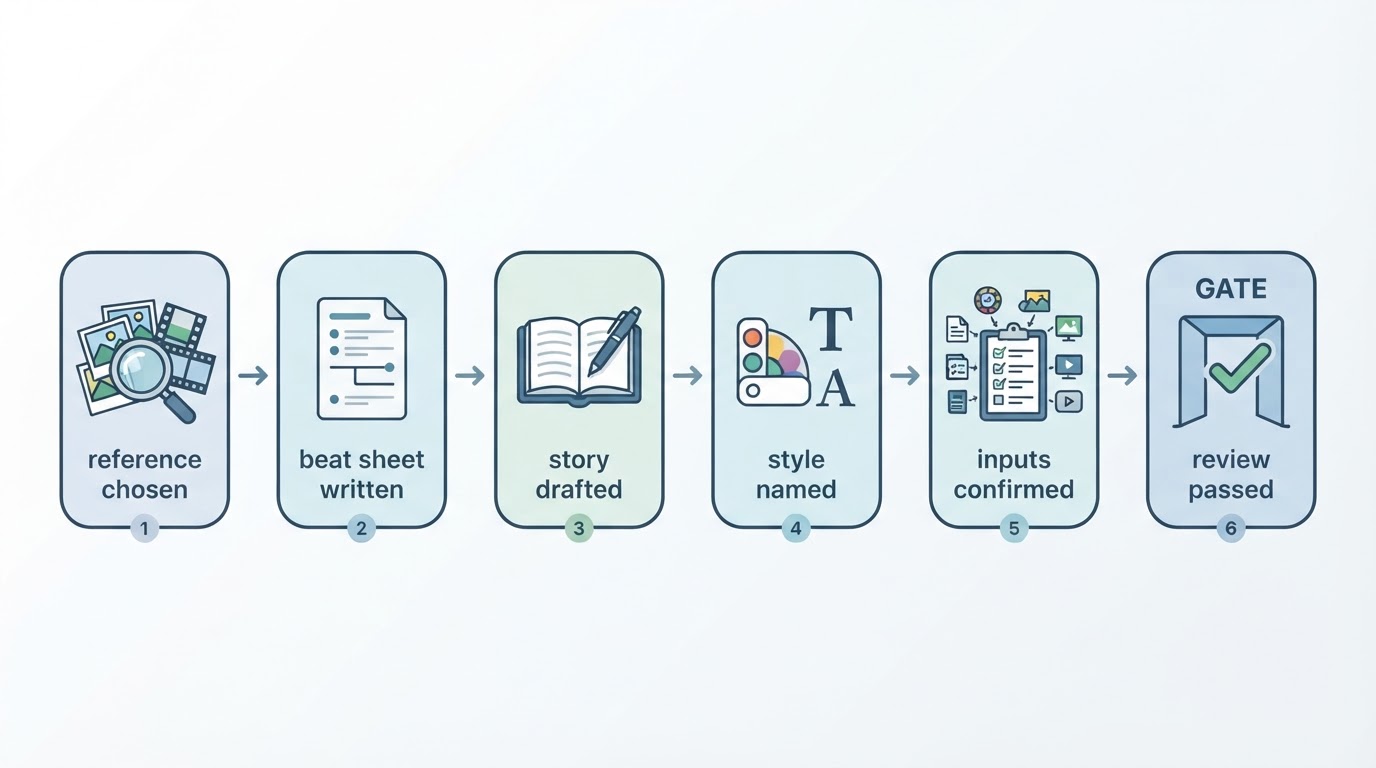
The completion check for this stage is simple: say the video out loud in three beats. If you cannot, the structure is still too vague to shoot, generate, or edit. Cut a beat rather than adding one.
Design the frame while you plan the story
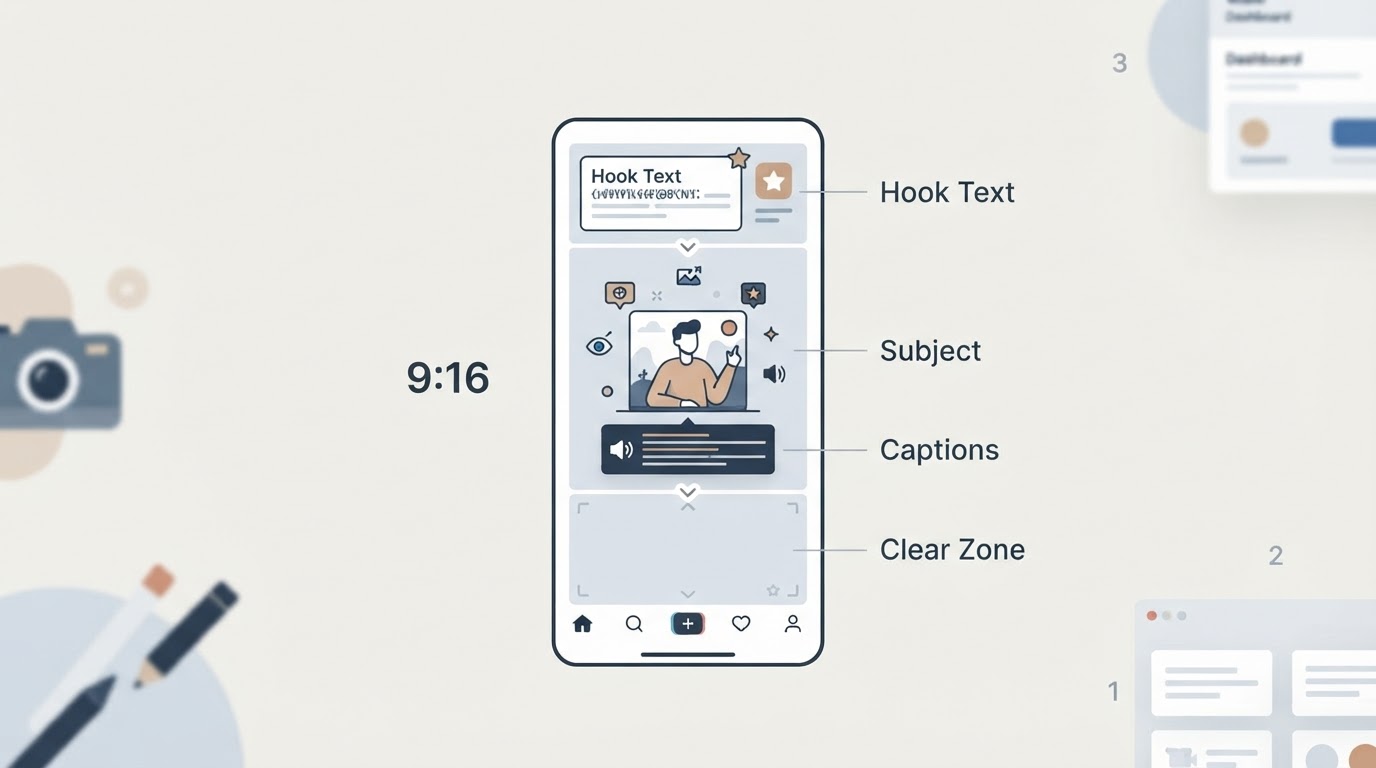
Vertical composition is not a cropped landscape shot. Plan for a tall frame from the beginning: keep the subject in the center band, place any important text in the middle third, and leave the bottom of the frame free. Captions, buttons and interface elements sit over the lower part of the video, so text placed there is often hidden or unreadable. Deciding this during planning saves a re-render later.
If you are generating the video instead of filming it, the same brief applies. Describe the opening action, the order of shots, and the closing image in plain language. The parts of the brief you can check quickly are the hook and the payoff, so write those two first and build the middle around them.
Reference, Rewrite, Rights: Take the Structure and Leave the Footage
Most good vertical videos start with a reference, and that is a legitimate starting point. The useful thing to learn from a reference is its construction: how quickly it opens, how many shots it uses, where the turn happens, and how it ends. Watch a candidate reference three times — once for the overall effect, once with the sound off to count shots, and once for the audio and on-screen text.
Break down, rewrite, then check permissions
- Break down. Name the hook type, list the shots in order with rough durations, and note where the ending returns to the opening. Write it down as a short list. Memory smooths over exactly the details that make the pacing work.
- Rewrite. Keep the rhythm and replace the content. Use your own subject, your own words, and your own footage or generated scenes. A rewritten video should be describable without mentioning the reference at all.
- Check permissions. Structure and pacing are a method you can learn from. Footage, music and a person's likeness are not yours to reuse just because you found them. That distinction is where most copy attempts go wrong.
The legal part is worth stating plainly. The U.S. Copyright Office notes that permission is generally needed to use someone else's work, that only the copyright owner can authorize a new version, and that changing a work does not transfer rights (Copyright Office fair use FAQ). Fair use permits limited portions of a work for purposes such as commentary, criticism, news reporting and scholarship, but there is no fixed rule about how many words, notes or seconds are acceptable, and the Office recommends getting permission when a use is in doubt.
Audio has its own layer. Instagram separates original audio from licensed audio: licensed audio is copyrighted material drawn from the Instagram audio library, and it must be attributed to the artist along with the track name. Instagram also states that a track in a post can be muted if music rights agreements change, while the post itself remains viewable (Instagram Reels audio). A reference sound is therefore not a durable asset. Record your own audio or a voiceover, and the piece survives a muting change.
Likeness deserves the same caution in practice. A reference video is not permission to reuse someone's face or voice, and asking first is cheaper than taking a video down later.
Meltica, a reference-first video workspace, publishes a public guide library that covers this same reference-to-brief method in more depth, including a step-by-step breakdown of analyzing a video reference and a worked brief example. The library also carries the rights caution directly: finding a reference grants no reuse rights to footage, music or likeness.
Frame, Text, Sound: Run the Three Checks Before You Post
Once the clip exists, the remaining work is verification, not creativity. Three passes catch nearly everything that makes a finished vertical video look unfinished.
Reels are vertical, full-screen, and 9:16 in practice, and the same clip is cropped differently across feed and grid surfaces. Practical guides consistently warn that interface elements occupy the lower part of the frame; one widely quoted recommendation from Meta's Reels partner manager is to keep the bottom 35% of the 9:16 creative clear of text, logos and key elements (Sprout Social Reels guide).
The three checks
- Frame. Watch with the interface overlaid. Is the subject centered, is any important text inside the middle band, and is the bottom band clean? If a caption collides with a button, move the text up rather than shrinking it.
- Text. Read every caption at arm's length on a phone. One idea per caption, high contrast, and no long sentences that disappear before they can be read. If a viewer has to pause to read, the caption is too dense.
- Sound. Listen once with headphones. Voiceover should be consistent in level, the audio should start immediately rather than a beat late, and nothing should depend on a licensed track staying available.
Export settings are where guide values and app behaviour diverge. Third-party sizing guides list 1080 x 1920 pixels, 30 FPS, MP4 or MOV containers and a 4GB maximum file size for Reels (Hootsuite video sizes guide). Treat those as guide values rather than an official spec sheet, and confirm the current limit in the app. Published length guidance also conflicts — one guide states 15 to 90 seconds, another states 3 seconds to 15 minutes with a shorter in-app recording cap — which suggests the limits change. Plan a runtime that fits comfortably inside the shorter figure.
Then watch the whole video once without pausing, the way a viewer will. Look for unnatural motion, mouth shapes that do not match the words, text drifting into the interface, an abrupt ending, and a first frame that is unclear at thumbnail size. Fix one problem at a time and re-export, because changing several things at once makes it hard to tell which fix worked.

Two finishing details are worth the extra minute. Choose a cover frame that reads clearly when it is small, and check that the last frame answers the first frame. A clean loop is the cheapest replay you will ever get.
Three beats to leave with: plan the hook, the shot order and the payoff before you generate anything; rewrite a reference's structure instead of its footage; then check the frame, the text and the sound before you export.